
1. Selelekela
The BUFFALO Giga Switching Hub LSW3-GT-24NSR is a 24-port Gigabit Ethernet switch designed for high-speed network environments. It is ideal for small to medium-sized offices and workplaces requiring robust and reliable network connectivity. This device supports full Gigabit speeds across all ports, ensuring efficient data transfer.
Key features include a fanless design for silent operation and enhanced reliability, as well as a loop detection function to prevent network disruptions caused by accidental network loops.
2. Boitsebiso ba Tšireletseho
Please read and understand the following safety precautions before using the device to prevent injury or damage.
- Phepelo ea motlakase: Use only the provided power adapter. Ensure the power outlet meets the specified voltage litlhoko.
- Moea oa moea: Se ke oa thibela menyetla ea moea. Etsa bonnete ba hore ho na le moea o lekaneng ho potoloha sesebelisoa ho thibela mocheso o feteletseng.
- Tikoloho: Avoid exposing the device to water, high humidity, extreme temperatures, or direct sunlight.
- Ho tšoara: Do not drop or subject the device to strong impacts. Do not attempt to open or repair the device yourself. Refer all servicing to qualified personnel.
- Likhoele: Ensure all network cables are properly connected and secured.
3. Likahare tsa Sephutheloana
Netefatsa hore lintho tsohle li teng ka har'a sephutheloana:
- BUFFALO Giga Switching Hub LSW3-GT-24NSR Unit
- Motlakase oa Motlakase
- Rack Mount Brackets (if included with your model)
- Rubber Feet (for desktop placement)
4. Seta
4.1 Ho Kena ka Sebele
The LSW3-GT-24NSR can be installed on a desktop or mounted in a 19-inch equipment rack.
Sebaka sa Desktop:
- Attach the included rubber feet to the bottom of the unit to prevent slipping and provide stability.
- Place the unit on a flat, stable surface with adequate ventilation.
Ho Beha Raka:
- Attach the rack mount brackets to the sides of the unit using the provided screws.
- Secure the unit into a standard 19-inch equipment rack using appropriate rack screws (not included).
4.2 Ho hokela Lithapo tsa Marang-rang
Connect your network devices (computers, servers, other switches) to any of the 24 RJ-45 ports on the front panel using standard Ethernet cables (Category 5e or higher recommended for Gigabit speeds).

Setšoantšo sa 1: Phanele e ka Peleview with 24 Ethernet Ports and Status LEDs.
4.3 Matla a ho Hokela
- Connect the power cable to the AC IN port on the rear of the device.
- Hokela ntlha e 'ngoe ea thapo ea motlakase sebakeng se loketseng sa motlakase.
- The device will power on automatically. The POWER LED on the front panel should illuminate.

Setšoantšo sa 2: Phanele e ka Morao e Holimoview with AC IN Power Port.
5. Litaelo tsa Ts'ebetso
5.1 Lipontšo tsa LED
The front panel features several LED indicators to monitor the status of the switch and its ports.
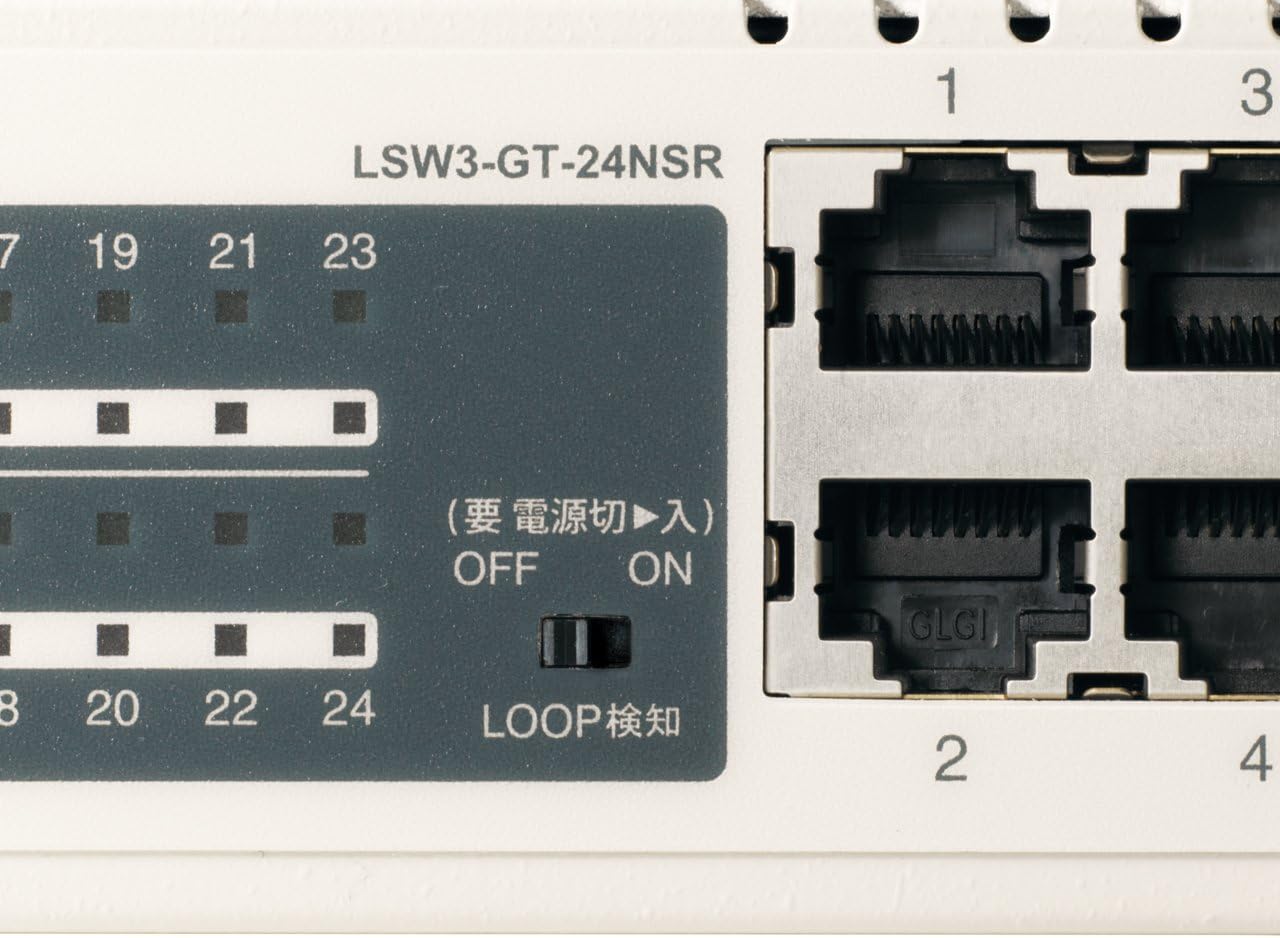
Setšoantšo sa 3: Ka botlalo view of LED Indicators and Loop Detection Switch.
| LED Lebitso | Boemo | Tlhaloso |
|---|---|---|
| MATLA | On | Sesebelisoa se buletsoe. |
| LINK / MOLAO (ka boema-kepe) | On | A network device is connected and a link is established. |
| Ho benya | Lintlha li ntse li fetisoa kapa li amoheloa ka boema-kepe. | |
| 1000/100/10M (ka boema-kepe) | Botala | Port is operating at 1000 Mbps (Gigabit Ethernet). |
| namunu | Port is operating at 100 Mbps (Fast Ethernet). | |
| E tima | Port is operating at 10 Mbps (Ethernet). | |
| LOOP DETECT | On | A network loop has been detected. |
5.2 Loop Detection Function
The LSW3-GT-24NSR features a hardware switch for enabling or disabling the loop detection function. This function helps prevent network instability caused by accidental network loops.
Figure 4: Loop Detection Switch (ON/OFF).
- BULELA: Loop detection is active. If a loop is detected, the corresponding port will be automatically shut down to prevent network broadcast storms, and the LOOP DETECT LED will illuminate.
- TIMA: Loop detection is disabled.
It is recommended to keep the loop detection function ON for network stability.
6. Tlhokomelo
6.1 Ho hloekisa Sesebelisoa
To maintain optimal performance, periodically clean the exterior of the switch.
- Tlosa thapo ea motlakase pele u e hloekisa.
- Sebelisa lesela le bonolo, le omeletseng ho hlakola bokaholimo.
- Do not use liquid cleaners, aerosols, or solvents, as these may damage the casing kapa likarolo tse ka hare.
6.2 Maikutlo a Tikoloho
Ensure the device is operated within its specified environmental conditions:
- Mocheso: 0°C ho isa ho 40°C (32°F ho isa ho 104°F)
- Mongobo: 10% ho isa ho 85% (ha e fokotsehe)
7. Ho rarolla mathata
If you encounter issues with your BUFFALO Giga Switching Hub, refer to the following common problems and solutions.
7.1 Ha ho Matla
- Letšoao: LED ea MATLA e timme.
- Tharollo: Check if the power cable is securely connected to both the device and the power outlet. Ensure the power outlet is functional.
7.2 No Link or Slow Speed on a Port
- Letšoao: The LINK/ACT LED for a connected port is off, or the 1000/100/10M LED indicates a lower speed than expected (e.g., 100M instead of 1000M).
- Tharollo:
- Netefatsa hore thapo ea Ethernet e hokahane ka mokhoa o sireletsehileng lipheletsong ka bobeli.
- Try a different Ethernet cable. Ensure it is a Category 5e or higher cable for Gigabit speeds.
- Hokela sesebelisoa boema-kepeng bo fapaneng ho switjha.
- Check the network adapter settings on the connected device (computer, server) to ensure it is configured for auto-negotiation or the correct speed.
7.3 Network Instability / LOOP DETECT LED is On
- Letšoao: The LOOP DETECT LED is illuminated, and network performance is degraded or unstable.
- Tharollo:
- A network loop has been detected. This typically occurs when two ports on the same switch (or different switches) are connected to each other, creating an infinite data path.
- Carefully inspect your network cabling to identify and remove any redundant connections that form a loop.
- If the loop detection switch is ON, the affected port will be automatically shut down. Once the loop is resolved, the port should resume normal operation.
8. Litlhaloso
| Sebopeho | Tlhaloso |
|---|---|
| Brand | NARE |
| Nomoro ea Mohlala | LSW3-GT-24NSR |
| Palo ea Boema-kepe | 24 x 10/100/1000BASE-T RJ-45 likoung |
| Ho Fetola Bokhoni | 48 Gbps (Non-blocking) |
| Fetisetse Rate | 35.7 Mpps |
| Boholo ba Tafole ea MAC | Menyako ea 8K |
| Tšehetso ea Jumbo Frame | Ho fihlela 9KB |
| Likaroloana | Auto-MDI/MDIX, Auto-Negotiation, Loop Detection Function, Fanless Design |
| Phepelo ea motlakase | Ka hare ho motlakase oa AC |
| Litekanyo (W x D x H) | (Specific dimensions not provided in source, typical for 1U rackmount) |
| Boima ba 'mele | (Specific weight not provided in source) |
| Mocheso oa ho sebetsa | 0°C ho isa ho 40°C |
| Mongobo o sebetsang | 10% ho isa ho 85% (ha e fokotsehe) |
9. Tiisetso le Tšehetso
This BUFFALO product is covered by a manufacturer's warranty. Please refer to the warranty card included with your product or visit the official BUFFALO websebaka bakeng sa lintlha le lipehelo tse qaqileng tsa tiisetso.
For technical support, product registration, or further assistance, please visit the official BUFFALO support websebaka kapa ikopanye le lefapha la litšebeletso tsa bareki. Lintlha tsa puisano li ka fumanoa ho moetsi websetsheng kapa sephuthelong sa sehlahiswa.