
DigiTech BP90
DigiTech BP90 Bass Guitar Multi-Effects Processor
Bukana ea Mosebelisi
Selelekela
The DigiTech BP90 is a compact multi-effects pedal designed specifically for bass guitar. It integrates a wide array of effects, amplifier and cabinet models, a drum machine, a chromatic tuner, and an expression pedal into a single unit, offering comprehensive tonal control and practice tools for bassists.
Boitsebiso ba Tšireletseho
- Ensure the correct power supply is used (9V DC, 300mA). Using an incorrect power supply can damage the unit and void the warranty.
- Se ke oa pepesetsa yuniti pula kapa mongobo ho thibela mollo kapa ts'ebetso ea motlakase.
- Qoba ho beha yuniti haufi le mehloli ea mocheso joalo ka li-radiator, li-heat registers, li-stove, kapa lisebelisoa tse ling (ho kenyeletsoa amplifiers) tse hlahisang mocheso.
- Sireletsa thapo ea motlakase hore e se ke ea tsamauoa kapa e penngoa, haholo-holo ha li-plug, litšepe tse bonolo, le moo li tsoang teng.
- Hloekisa feela ka lesela le omeletseng.
- Fetisetsa lits'ebeletso tsohle ho basebetsi ba tšoanelehang. Ts'ebeletso e hlokahala ha lisebelisoa li senyehile ka tsela efe kapa efe, joalo ka thapo ea phepelo ea motlakase kapa plug e senyehile, mokelikeli o tšolohile kapa lintho li oele ka har'a lisebelisoa, sesebelisoa se pepesehetse pula kapa mongobo, ha se sebetse ka mokhoa o tloaelehileng. , kapa e lahliloe.
Likarolo tsa Bohlokoa
- 32 Bass effects
- 11 Amp mehlala
- 5 Cabinet models
- 100 Presets (50 Factory / 50 User)
- Built-in drum machine with 40 different patterns
- Built-in expression pedal for real-time control over wah, volume, and DigiTech Whammy effects
- Built-in chromatic tuner
- Independent Left/Right outputs
- Kenyelletso e thusang
- Dedicated headphone output
- Phepelo ea Matla e kenyelelitsoe
Litaolo le Lihokelo
Panel e ka pele ho fetaview

Setšoantšo sa 1: Pele view of the DigiTech BP90, showing the display, control buttons, and footswitches.
The front panel of the BP90 features a clear LED display for showing preset numbers and parameter values. Below the display are several control buttons for navigating menus and adjusting settings, including "EDIT", "TONE LIBRARY", "EFFECTS LIBRARY", "EFFECTS LEVEL", "MASTER LEVEL", and "STORE". Two footswitches are located at the bottom left for preset changes and bypass, while a large expression pedal is on the right for real-time effect control.
Tlhaloso ea Pedal
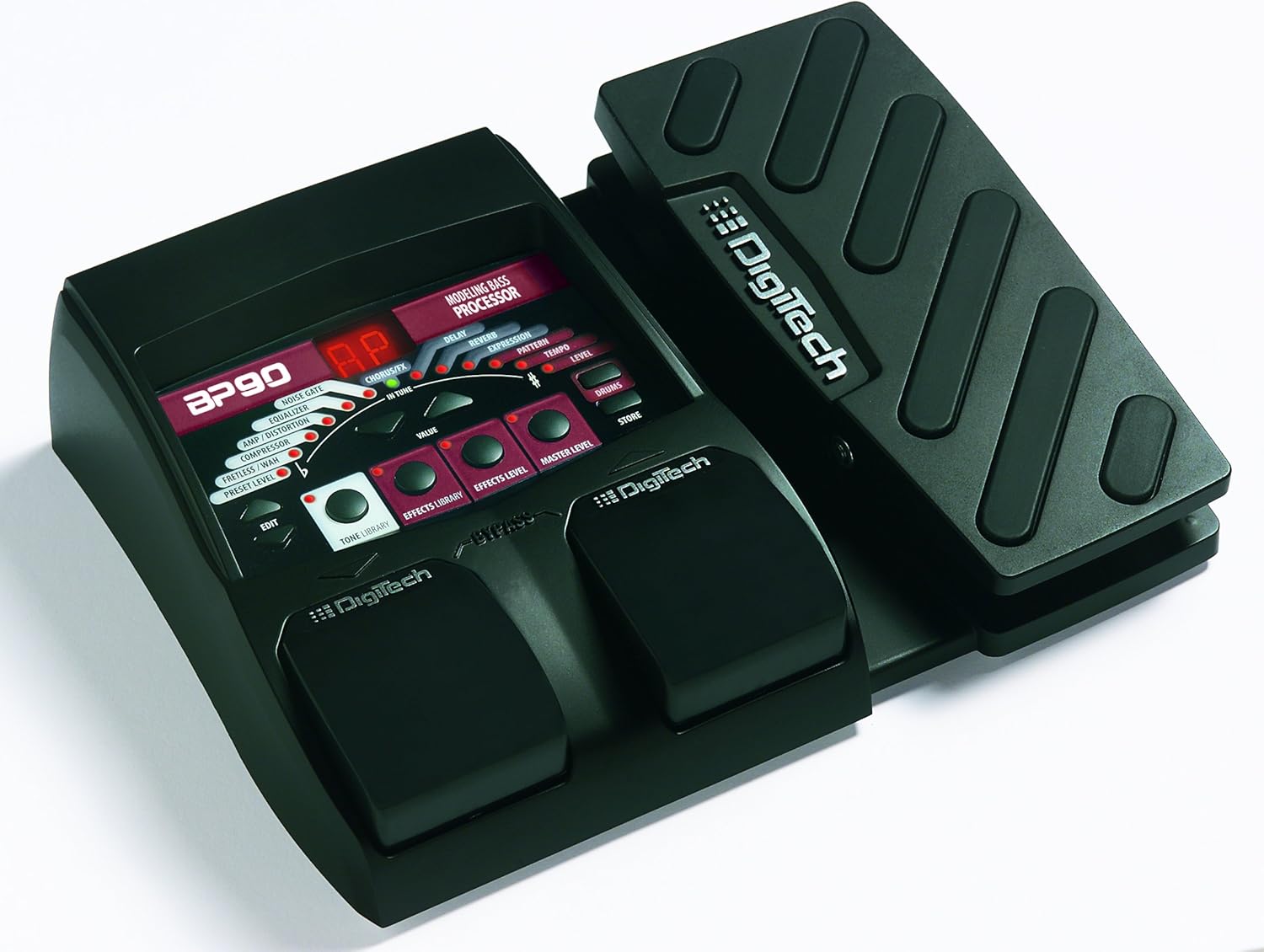
Setšoantšo sa 2: Angled view of the DigiTech BP90, highlighting the integrated expression pedal.
The integrated expression pedal allows for dynamic control over various effects such as Wah, Volume, and the unique DigiTech Whammy effect. Its robust design ensures reliable performance during live use or practice sessions.
Lihokelo tsa Panel tse ka morao

Setšoantšo sa 3: Ka morao view of the DigiTech BP90, displaying all input and output jacks.
The rear panel provides all necessary connections for the BP90. These include the KEKETSO jack for your bass guitar, LE LETSATSI (MONO) le TS'ELISO NTS'OANE jacks for connecting to an amplifier or mixer, an AUX TLALI jack for external audio sources, a dedicated SEHLOOHO TSOELA jack for silent practice, and the 9VDC 300mA ho kenya matla.
Tlhophiso
- Connect your bass guitar to the KEKETSO jack on the rear panel of the BP90.
- Connect the LEFT (MONO) OUT jack to your bass amplifier's input or a mixer. For stereo output, connect both LETS'ELA le TS'ELISO NTS'OANE jacks to a stereo ampsefepi kapa mokopanyi.
- If desired, connect an external audio source (e.g., MP3 player) to the AUX TLALI jack for practice along with music.
- For silent practice, connect headphones to the SEHLOOHO TSOELA jack.
- Connect the included 9V DC power supply to the 9VDC 300mA input on the rear panel and then plug it into a wall outlet. The unit will power on automatically.
Litaelo tsa Ts'ebetso
Ho tsamaisa li-Presets
The BP90 comes with 100 presets, divided into 50 factory presets (51-100) and 50 user presets (01-50). Use the footswitches to cycle through presets. Pressing both footswitches simultaneously typically engages the bypass mode, allowing your clean bass signal to pass through.
Editing Effects and Amp Mehlala
Tobetsa ea HLOKOMELA button to enter edit mode. Use the TONE LIBRARY le EFFECTS LIBRARY buttons to select different amp models, cabinet models, and individual effects. Adjust parameters using the VALUE knob (or corresponding buttons). The EFFECTS LEVEL le MOTS'EOA MOEKETSI controls adjust the overall effect mix and output volume, respectively. Remember to press LEBEKENG to save your changes to a user preset location (01-50).
Using the Drum Machine
The BP90 includes 40 built-in drum patterns for practice. Activate the drum machine by pressing the LIEKETSENG button. Use the controls to select different patterns and adjust the tempo. This feature is ideal for developing rhythm and timing.
Chromatic Tuner e hahiloeng kahare
The integrated chromatic tuner allows for accurate tuning of your bass. Refer to the display for tuning indications. The tuner typically mutes the output signal when engaged, allowing for silent tuning.
Expression Pedal Functions
The expression pedal can be assigned to control various parameters within a preset, such as wah intensity, volume level, or the pitch shift of the Whammy effect. Consult the detailed manual for specific instructions on assigning and calibrating the expression pedal for different effects.
Tlhokomelo
- Keep the unit clean by wiping it with a soft, dry cloth. Avoid using abrasive cleaners or solvents.
- Store the BP90 in a cool, dry place away from direct sunlight and extreme temperatures.
- When not in use for extended periods, disconnect the power supply.
- Regularly check all cables and connections for wear and tear to ensure optimal performance and safety.
Ho batle phoso
| Bothata | Lebaka le ka khonehang | Tharollo |
|---|---|---|
| Ha ho tlhahiso ea molumo. | Incorrect connections, low volume, unit in tuner/bypass mode. | Check all cable connections. Ensure Master Level is up. Exit tuner mode or bypass mode by pressing footswitches. |
| Molumo o sothehileng kapa o lerata. | Input level too high, faulty cables, incorrect power supply. | Adjust input level on your bass or the BP90. Try different cables. Ensure you are using the correct 9V DC 300mA power supply. |
| Yuniti ha e sebetse. | Power supply not connected, faulty power supply or outlet. | Verify power supply is securely connected to the unit and a working power outlet. Test the outlet with another device. |
| Expression pedal not responding. | Pedal not assigned to a parameter, calibration issue. | Ensure the expression pedal is assigned to the desired effect parameter within the preset. Refer to the full manual for calibration procedures. |
Litlhaloso
- Boima ba Ntho: 1.52 liponto
- Boholo ba Sehlahisoa: 6.5 x 8.5 x 2 lisenthimithara
- Nomoro ea Mohlala: BP90
- Mmala: Botsho/Bofubedu
- Sebopeho sa Hardware: HP-HSC
- Sebopeho sa Matsoho: Analoge
- Mohloli oa Matla: Motlakase oa Corded
- Moqtage: 9V
- Letsatsi la Pele la ho Fumaneha: La 24 Phuptjane 2010
Warranty le Tšehetso
For detailed warranty information and technical support, please refer to the official DigiTech websebaka kapa ikopanye le litšebeletso tsa bareki. Boloka bopaki ba hau ba theko bakeng sa likopo life kapa life tsa waranti.
You can often find additional resources, FAQs, and firmware updates on the manufacturer's support pages.
Ask a question about this manual
Ask about setup, troubleshooting, compatibility, parts, safety, or missing instructions. Manuals+ will review the question and use this page’s manual context to help answer it.